Quickstart
A document and some shapes
import svgwriter as svg

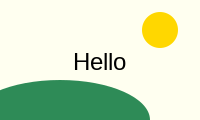
doc = svg.Document(200, 120)                       # width, height and a matching viewBox
doc.rect(0, 0, 200, 120, fill="ivory")
sun = doc.circle(160, 30, 18, fill="gold")
hill = doc.ellipse(60, 120, 90, 40, fill="seagreen")
doc.text("Hello", x=100, y=70, font_size=24, text_anchor="middle")
doc.save("hello.svg")
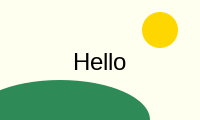
Every SVG element is a class (svg.Circle) with a lowercase alias (svg.circle). Documents and groups
have shortcuts (doc.circle(...)) that build, add and return the element. Keyword arguments are SVG
attributes in Python spelling: stroke_width is stroke-width, class_ is class.
Move things
sun.translate(-20, 10)          # move
sun.scale(1.5)                  # about its centre (the anchor)
hill.rotate(-5)                 # 5 degrees counter-clockwise (positive turns clockwise on screen)
print(sun.position)             # where its centre is now
doc
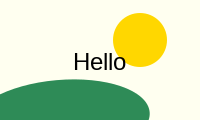
Geometry attributes (cx, x, d, …) stay as written; placement goes through the element’s
matrix (its transform). See Geometry and transforms.
Combine and measure
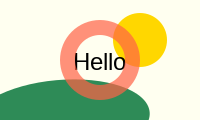
ring = svg.circle(0, 0, 40) - svg.circle(0, 0, 25)    # boolean difference, a <path>
print(ring.total_length(), ring.contains_point(30, 0))
doc += ring.place(100, 60).update(fill="tomato", opacity=0.7)
Render and export
pixels = doc.rasterize(scale=2)       # numpy float32 RGBA, shape (240, 400, 4)
doc.save("hello.png", scale=2)
doc.save("hello.pdf")                 # vector PDF
doc.save("hello.tex")                 # TikZ
Read it back
again = svg.Document.open("hello.svg")
print(again[0].tag, len(again))       # top-level content by index
Start a project
For a design with its own theme, components and outputs, start a project folder from a preset and let the command line build it:
svgwriter new my-poster --preset poster      # or: blank, slides, animation (--notebook for main.ipynb)
cd my-poster
svgwriter preview                            # a browser page that reloads on every save
svgwriter build                              # PDF, SVG and PNG into output/
Named sizes work in any document: svg.Document(size="a4") draws in millimetres. See
Projects.
Seeing your drawing
In a Jupyter notebook, a document on the last line of a cell shows as a picture, and svg.explore(fn) adds
sliders and pickers. In a plain script, doc.save("hello.svg") (or .png, .pdf) writes the file next to
the script; open it in a browser or image viewer. In a project, svgwriter preview shows it live.
Next steps
The examples: a 27-step learning path, from a first drawing to animation, PowerPoint and fonts, each a script with a notebook of pictures.
Geometry and transforms to move, rotate and align, Text for type, Themes for colours and roles, Animation to make things move, and Export and import for every file format.