Inkscape
Layers, labels, editable stars and arcs, connectors, guides and export hints; see the
Inkscape guide (layers are also in the Documents guide). Document.layer, Document.layers, Document.guides,
Document.guide and Document.export_hints are documented with Document.
Inkscape documents: layers, labels, editable stars and arcs, connectors, guides and export hints.
Files saved by Inkscape read and write back with their inkscape: and
sodipodi: data intact; this package gives that data a Python interface.
Document exposes the common parts directly
(doc.layer, doc.layers, doc.guides, doc.export_hints).
- class Arc(path: Element)[source]
Bases:
_ShapeThe editable parameters of an Inkscape ellipse, arc or pie slice.
A live view on a
<path sodipodi:type="arc">; assigning a property writes thesodipodi:attribute and redrawsd.- Parameters:
path (Path) – A path carrying
sodipodi:type="arc".- Raises:
ValueError – If path is not an Inkscape arc.
See also
StarThe same for stars and polygons.
Notes
Angles are in degrees, clockwise from the x axis (Inkscape stores radians).
Examples
>>> import svgwriter as svg
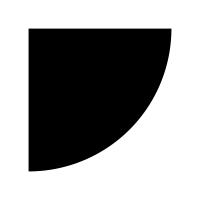
>>> pie = svg.inkscape.Arc.create(0, 0, 10, 10, start=0, end=90)
>>> svg.inkscape.Arc(pie).kind
'slice'
- shape_type = 'arc'
- classmethod create(cx: float, cy: float, rx: float, ry: float, *, start: float = 0.0, end: float = 0.0, kind: str = 'slice', **kwargs: Any) Path[source]
Build a new arc path with Inkscape’s parameters.
- Parameters:
cx (float) – Centre.
cy (float) – Centre.
rx (float) – Radii.
ry (float) – Radii.
start (float, optional) – Angles in degrees; equal angles give a whole ellipse. Default to 0.
end (float, optional) – Angles in degrees; equal angles give a whole ellipse. Default to 0.
kind ({"slice", "arc", "chord"}, optional) – A pie slice, an open arc or a closed chord. Defaults to
"slice".**kwargs – Presentation attributes for the path.
- Returns:
Path – The arc, with
sodipodi:parameters and matchingd.- Raises:
ValueError – If kind is unknown.
Examples
>>> import svgwriter as svg
>>> svg.inkscape.Arc.create(5, 5, 4, 2).bbox
BBox(x=1.0, y=3.0, width=8.0, height=4.0)
- class Connection(start: Element | None, end: Element | None)[source]
Bases:
NamedTupleThe objects a connector joins; either end may be None when it is loose.
- Variables:
end (start,) – The objects at each end.
Examples
>>> from svgwriter.formats.inkscape import Connection
>>> Connection(None, None).start is None
True
- class ExportHints(dpi: float | None = None, filename: str | None = None, units: str | None = None)[source]
Bases:
objectWhat Inkscape remembers about exporting a document.
- Parameters:
dpi (float, optional) – Resolution of the last bitmap export (
inkscape:export-xdpi); raster exports use it when noscale,dpiorsizeis given. Defaults to None.filename (str, optional) – Where Inkscape last exported (
inkscape:export-filename). Defaults to None.units (str, optional) – The unit Inkscape’s rulers and toolbars show (
inkscape:document-unitson<sodipodi:namedview>), such as"mm". Defaults to None.
See also
svgwriter.Document.export_hintsRead or set them on a document.
Examples
>>> from svgwriter.formats.inkscape import ExportHints
>>> ExportHints(dpi=300).dpi
300
- class Guide(x: float, y: float, angle: float = 0.0, label: str | None = None, color: str | None = None, locked: bool = False)[source]
Bases:
objectA guide line, in the document’s user units with y pointing down.
- Parameters:
x (float) – A point the line passes through.
y (float) – A point the line passes through.
angle (float, optional) – Direction of the line in degrees, clockwise from the x axis: 0 is horizontal, 90 vertical. Defaults to 0.
label (str, optional) – The name shown next to the guide. Defaults to None.
color (str, optional) – Guide colour, as Inkscape writes it (
"#0000ff"). Defaults to None.locked (bool, optional) – Whether the guide can be dragged. Defaults to False.
See also
svgwriter.Document.guidesRead or replace a document’s guides.
Notes
Inkscape stores guide positions from the bottom-left of the
viewBoxwith y pointing up, and the orientation as the line’s normal; reading and writing convert both, so guides line up with the drawing’s own coordinates.Examples
>>> from svgwriter.formats.inkscape import Guide
>>> Guide.vertical(10).angle, Guide.horizontal(5, label="base").y
(90.0, 5)
- class Star(path: Element)[source]
Bases:
_ShapeThe editable parameters of an Inkscape star or polygon.
A live view on a
<path sodipodi:type="star">: reading a property reads thesodipodi:attribute, and assigning one writes it and redrawsdthe way Inkscape does, so the file stays an editable star in Inkscape.- Parameters:
path (Path) – A path carrying
sodipodi:type="star".- Raises:
ValueError – If path is not an Inkscape star.
See also
ArcThe same for ellipses and arcs.
svgwriter.library.paths.starinkscape=Truebuilds one.
Notes
Angles are in degrees, clockwise from the x axis (Inkscape stores radians).
inkscape:randomizedis kept but not applied to the redrawn outline; Inkscape applies it again when it opens the file.Examples
>>> import svgwriter as svg
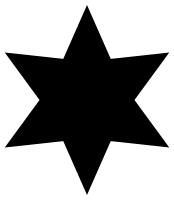
>>> star = svg.inkscape.Star.create(50, 50, 40, 20, 5)
>>> view = svg.inkscape.Star(star)
>>> view.sides = 6
>>> star.get("sodipodi:sides"), len(star.d)
(6, 13)
- shape_type = 'star'
- classmethod create(cx: float, cy: float, outer: float, inner: float, sides: int, *, angle: float = -90.0, flatsided: bool = False, rounded: float = 0.0, **kwargs: Any) Path[source]
Build a new star path with Inkscape’s parameters.
- Parameters:
cx (float) – Centre.
cy (float) – Centre.
outer (float) – Radii of the tips and of the notches.
inner (float) – Radii of the tips and of the notches.
sides (int) – Number of tips (corners for a polygon).
angle (float, optional) – Direction of the first tip in degrees. Defaults to -90 (up).
flatsided (bool, optional) – A regular polygon instead of a star. Defaults to False.
rounded (float, optional) – Inkscape’s rounding factor; 0 keeps sharp corners. Defaults to 0.
**kwargs – Presentation attributes for the path.
- Returns:
Path – The star, with
sodipodi:parameters and matchingd.
Examples
>>> import svgwriter as svg
>>> svg.inkscape.Star.create(0, 0, 10, 5, 4).get("sodipodi:type")
'star'
- redraw() None[source]
Recompute
dfrom the parameters, as Inkscape does.Examples
>>> import svgwriter as svg
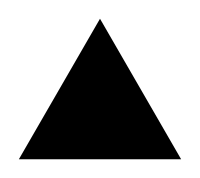
>>> star = svg.inkscape.Star.create(0, 0, 10, 5, 3)
>>> star.d = "M0 0"
>>> svg.inkscape.Star(star).redraw()
>>> len(star.d)
7
- by_label(root: Element, label: str) Element | None[source]
The element named label (
inkscape:label) under root, if exactly one has it.- Parameters:
- Returns:
Element or None – The element, or None when no element has that label.
- Raises:
KeyError – If several elements share the label.
Examples
>>> import svgwriter as svg
>>> root = svg.svg(svg.rect(0, 0, 1, 1, inkscape_label="Logo"))
>>> svg.inkscape.by_label(root, "Logo").tag
'rect'

- connect(path: Element, start: Element | None, end: Element | None, *, kind: str = 'polyline') None[source]
Make path an Inkscape connector from start to end.
Both ends receive an id if they have none. When both ends have known bounds, the path is redrawn as a straight line between their centres; Inkscape reroutes it around obstacles when the file is edited there.
- Parameters:
path (Element) – A
<path>.start (Element or None) – The objects to join; None leaves that end loose, and None for both turns the path back into a plain path.
end (Element or None) – The objects to join; None leaves that end loose, and None for both turns the path back into a plain path.
kind ({"polyline", "orthogonal"}, optional) – Inkscape’s routing style. Defaults to
"polyline".
- Raises:
ValueError – If kind is unknown.
Examples
>>> import svgwriter as svg
>>> a, b = svg.circle(0, 0, 5, id="a"), svg.circle(40, 0, 5, id="b")
>>> line = svg.Path(stroke="black")
>>> root = svg.svg(a, b, line)
>>> svg.inkscape.connect(line, a, b)
>>> str(line.d), line.attributes["inkscape:connection-end"]
('M0 0 L40 0', '#b')

- connection(path: Element) Connection | None[source]
The objects joined by an Inkscape connector, or None when path is not one.
- Parameters:
path (Element) – Usually a
<path>read from an Inkscape file.- Returns:
Connection or None – The start and end objects, found by id in the path’s document.
Examples
>>> import svgwriter as svg
>>> a, b = svg.rect(0, 0, 10, 10, id="a"), svg.rect(50, 0, 10, 10, id="b")
>>> line = svg.Path()
>>> root = svg.svg(a, b, line)
>>> svg.inkscape.connect(line, a, b)
>>> svg.inkscape.connection(line).end is b
True

- export_hints(root: Element) ExportHints[source]
The export hints stored on a document’s
<svg>and<sodipodi:namedview>.- Parameters:
root (Element) – A document’s
<svg>.- Returns:
ExportHints – Fields are None where the file has no hint.
Examples
>>> import svgwriter as svg
>>> svg.inkscape.export_hints(svg.svg(inkscape_export_xdpi=150)).dpi
150.0
- guides(root: Element) list[Guide][source]
The guides of an Inkscape document.
- Parameters:
root (Element) – A document’s
<svg>.- Returns:
list of Guide – In file order, in user units with y pointing down.
Examples
>>> import svgwriter as svg
>>> root = svg.svg(view_box="0 0 100 50")
>>> svg.inkscape.set_guides(root, [svg.inkscape.Guide.horizontal(10)])
>>> svg.inkscape.guides(root)[0].y
10.0

- is_layer(element: Element) bool[source]
Whether element is an Inkscape layer or sublayer.
- Parameters:
element (Element) – Any element.
- Returns:
bool – True for a
<g>withinkscape:groupmode="layer".
Examples
>>> import svgwriter as svg
>>> svg.inkscape.is_layer(svg.inkscape.new_layer("Sky")), svg.inkscape.is_layer(svg.group())
(True, False)
- layers(root: Element) dict[str, Group][source]
Every layer and sublayer under root, in document order, by label.
- Parameters:
root (Element) – Where to look, usually a document’s
<svg>.- Returns:
dict of str to Group – Layers by
inkscape:label(their id when unlabelled); when two share a label, the first one is kept.
Examples
>>> import svgwriter as svg
>>> root = svg.svg(svg.inkscape.new_layer("Back"), svg.inkscape.new_layer("Front"))
>>> list(svg.inkscape.layers(root))
['Back', 'Front']

- namedview(root: Element, *, create: bool = False) Element | None[source]
The
<sodipodi:namedview>holding Inkscape’s view settings and guides.- Parameters:
- Returns:
Element or None – The element, or None when there is none and create is False.
Examples
>>> import svgwriter as svg
>>> root = svg.svg()
>>> svg.inkscape.namedview(root) is None, svg.inkscape.namedview(root, create=True).tag
(True, 'namedview')

- new_layer(label: str, **kwargs: Any) Group[source]
Build an empty Inkscape layer.
- Parameters:
label (str) – The name Inkscape shows in its Layers panel (
inkscape:label).**kwargs – Attributes for the
<g>.
- Returns:
Group – The layer.
See also
svgwriter.Document.layerFind or add a layer of a document.
Examples
>>> import svgwriter as svg
>>> svg.inkscape.new_layer("Sky").label
'Sky'
- set_export_hints(root: Element, hints: ExportHints) None[source]
Store export hints on a document; None fields remove the hint.
- Parameters:
root (Element) – A document’s
<svg>.hints (ExportHints) – The hints to write.
Examples
>>> import svgwriter as svg
>>> root = svg.svg()
>>> svg.inkscape.set_export_hints(root, svg.inkscape.ExportHints(dpi=300, units="mm"))
>>> root.attributes["inkscape:export-xdpi"], svg.inkscape.export_hints(root).units
(300, 'mm')

- set_guides(root: Element, lines: list[Guide]) None[source]
Replace the guides of a document.
- Parameters:
Examples
>>> import svgwriter as svg
>>> root = svg.svg(view_box="0 0 100 50")
>>> svg.inkscape.set_guides(root, [svg.inkscape.Guide.vertical(30)])
>>> svg.inkscape.namedview(root).children[0].attributes["position"]
'30,50'

- shape(element: Element) Star | Arc | None[source]
The editable Inkscape star or arc behind element, or None for any other element.
- Parameters:
element (Element) – Any element, typically one read from an Inkscape file.
- Returns:
Star, Arc or None – A live view of the parameters.
Examples
>>> import svgwriter as svg
>>> type(svg.inkscape.shape(svg.inkscape.Star.create(0, 0, 4, 2, 5))).__name__
'Star'
>>> svg.inkscape.shape(svg.rect(0, 0, 1, 1)) is None
True