Performance and batches
Every svgwriter element is a Python object, which is what makes it easy to edit, query and animate. A
scatter plot of 100,000 points, a particle field or a grid of tiles does not need that per shape: the
shapes share a kind and differ only in numbers. svg.batch makes them from numpy arrays in one call and
keeps them as columns, so building, moving, recolouring and writing them are a few array operations.
import numpy as np
import svgwriter as svg

rng = np.random.default_rng(0)
x, y = rng.normal(200, 60, (2, 2_000))
doc = svg.Document(400, 400)
dots = doc.add(svg.batch.points(x, y, 2, fill=svg.batch.colormap("viridis", np.hypot(x - 200, y - 200)),
                                opacity=0.6))
print(len(dots), dots.compact)
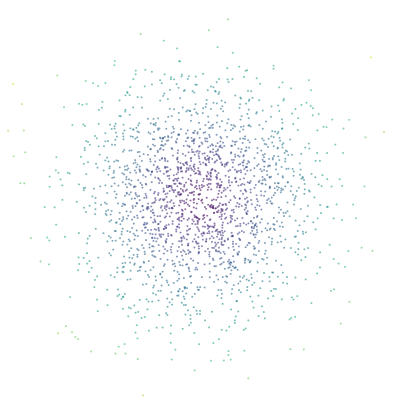
The output is ordinary SVG: one <circle> per point inside a <g>, the same markup a loop of
doc.circle(...) calls writes, so browsers, editors and every exporter see real shapes.
Making batches
Each factory takes scalars or arrays and broadcasts them together with numpy’s rules, so a scalar applies
to every item, a column vector against a row vector makes a grid, and 2-D arrays (np.meshgrid) are
flattened in order.
Factory |
Items |
|---|---|
|
|
|
dots: circles of diameter |
|
|
|
|
|
|
|
|
|
|
Every other keyword is an SVG attribute in Python spelling, with one value for all items or an array with one value per item:
import numpy as np
import svgwriter as svg

heights = np.array([12, 30, 22, 41, 18])
bars = svg.batch.rects(np.arange(5) * 14, 50 - heights, 10, heights, rx=2,
                       fill="steelblue", stroke_width=[0, 0, 2, 0, 0], stroke="black")
print(bars.item_markup()[2])
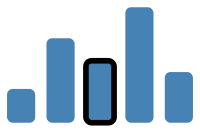
A value given once goes on the batch’s <g> when the property is inherited (fill, stroke,
stroke_width, font_size…) and on every item when it is not (opacity), so a shared opacity still
makes overlapping dots darker, as it would for separate shapes.
Colours and colormaps
fill, stroke and the other colour attributes take one paint, a list of colours, or an (N, 3) or
(N, 4) array: floats in 0..1 or integers in 0..255, with alpha written as fill-opacity or
stroke-opacity. svg.batch.colormap(name, values, vmin=None, vmax=None) turns data into such an array
from a built-in perceptual map (viridis, plasma, inferno, magma, cividis, turbo, grays;
svg.batch.colormaps() lists them):
import numpy as np
import svgwriter as svg

temperature = np.linspace(-5, 35, 9)
swatches = svg.batch.rects(np.arange(9) * 12, 0, 10, 10,
                           fill=svg.batch.colormap("inferno", temperature, vmin=-10, vmax=40))
print(swatches.column("fill")[:3].tolist())

Transforming and restyling
translate, rotate and scale take broadcast arguments too and move each item on its own; rotation
and scaling pivot about each item’s centre (a text’s anchor point, an instance’s placed anchor) unless
about=(x, y) gives pivots. set restyles every item, with the same rules as the factories, and
column(name) reads one attribute for all items (column("transform") is an (N, 6) array of
matrices).
import numpy as np
import svgwriter as svg

n = 500
angle = np.linspace(0, 12 * np.pi, n)
field = svg.batch.instances(svg.polygon([(-3, -1.5), (3, 0), (-3, 1.5)]), 200 + angle * 4 * np.cos(angle), 200 + angle * 4 * np.sin(angle),
                            angle=np.degrees(angle) + 90, fill=svg.batch.colormap("plasma", angle))
field.scale(np.linspace(0.5, 2, n)).translate(0, -10)
field.set(opacity=np.linspace(1, 0.3, n))
print(field.bounds())
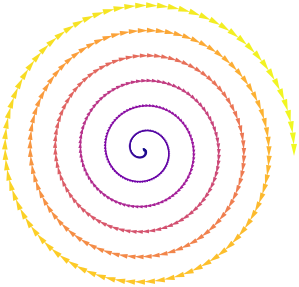
The batch’s own <g> transform is batch.matrix, and roles style the whole batch: batch.as_role("dot").
Items, expanding and animation
A batch stays compact (batch.compact) until an item is needed as an element: batch[i], iteration,
batch.items or batch.expand() turn the columns into real child elements, which then edit like any
other. Batch methods keep working afterwards, item by item.
import svgwriter as svg

dots = svg.batch.circles([10, 30, 50], 20, 6, fill="teal")
dots[1].fill = "tomato"
dots[1].animate.pulse()
print(dots.compact, [item.get("fill") for item in dots])

batch.animate runs any animation preset on every item. Array arguments with one value per item go to
their own item, and stagger starts each item that many seconds after the previous one:
import numpy as np
import svgwriter as svg

doc = svg.Document(200, 40)
wave = doc.add(svg.batch.circles(np.arange(10) * 20 + 10, 20, 6, fill="navy"))
wave.animate.fade_in(0.5, stagger=0.1).move_by(0, -10, dur=0.5, begin=np.linspace(1, 2, 10))
print([item.get("opacity") for item in doc.at(0.3).root[0]][:4])
doc.at(1.5)         # the dots part-way through their staggered hops


svg.interpolate(a, b, t) blends two batches of the same size: compact batches column by column
(numbers, colours, per-item transforms the short way round), others item by item.
Rendering and export
Writing SVG, rendering PNG and the other raster formats keep a compact batch compact: its markup is
produced column by column. PDF, PowerPoint, TikZ and the other exporters that draw shape by shape expand
a copy, so every item stays a separate shape there. Style sheet rules that select items one by one
(circle { ... }) reach expanded items only; style a compact batch through its <g>.
Rough timings for 100,000 circles of random size and position, best of three on one desktop machine:
Step |
Element by element |
Batch |
|---|---|---|
build |
2.8 s |
0.3 ms |
transform every item |
3.9 s |
9 ms |
write SVG |
1.4 s |
0.14 s |
render PNG |
6.3 s |
1.7 s |
Most of the remaining rendering time is skia parsing and drawing 100,000 elements; python scripts/dev.py svgwriter bench measures these steps on your machine.