Layout
Stacks and grids place their children by size, so cards, panels, toolbars and keypads keep their spacing
when the content or a parameter changes. svg.VStack lays children out top to bottom, svg.HStack left
to right and svg.Grid in rows and columns. Each is a <g>: it moves its children with transforms (and
resizes the ones it stretches), so the output is plain SVG that every exporter keeps.
import svgwriter as svg

card = svg.VStack(
    svg.text("Storage", font_size=16).as_role("title"),
    svg.text("42 GB of 64 GB used", font_size=12).as_role("caption"),
    svg.rect(width=0, height=8, rx=4).as_role("accent"),
    gap=8, padding=16, align="stretch", background=svg.rect(0, 0, 1, 1, rx=12).as_role("surface"),
)
doc = svg.Document(theme="light")
doc += card
print(card.bounds())
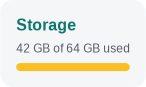
The card is one call: the background is sized to the stack, align="stretch" widens the bar to the
widest line, and the document sizes itself around the card.
Stacks
A stack’s main axis runs along its children; the cross axis runs across them.
Argument |
Values |
Meaning |
|---|---|---|
|
length |
space between neighbours |
|
length, |
space inside the edges, as in CSS |
|
|
placement across the axis (CSS |
|
|
free space along the axis (CSS |
|
length or None |
fixed outer size; None fits the content |
|
shape or role name |
drawn behind the children, sized to the stack |
"stretch" resizes rects, images and nested layouts to the stack’s cross size; other shapes keep their
size and sit at the start. A stretched child goes back to its own size when the stack shrinks.
svg.Spacer() takes the free space along the axis, so a toolbar pushes its last buttons to the right
edge. Spacers share the space by their grow weight:
import svgwriter as svg

button = lambda label: svg.HStack(svg.text(label, font_size=12), padding=(4, 10), background="box")
bar = svg.HStack(button("Back"), svg.Spacer(), button("Save"), button("Share"),
                 width=300, gap=6, align="center")
print([round(child.bounds().x) for child in bar if not isinstance(child, svg.Spacer)])

Grids
columns is a count of equal columns or one size per column, written like CSS grid tracks:
"auto"fits the widest child in the column;a number or a length (
40,"12mm") is fixed;"1fr","2fr"share the free width, but never less than their content.
A list (["auto", "1fr", 40]) and a space-separated string ("auto 1fr 40") are the same. Rows are
written the same way with rows; rows past the listed ones, or all of them by default, are "1fr", so
they come out equal. Without a fixed size, "1fr" tracks take the size of the largest content, which
makes a keypad’s keys equal.
import svgwriter as svg

keys = [svg.VStack(svg.text(k, font_size=16), padding=10, align="center", background="box")
        for k in "789456123"]
zero = svg.VStack(svg.text("0", font_size=16), padding=10, align="center", background="box")
pad = svg.Grid(*keys, zero, columns=3, gap=(6, 6))
pad.span(zero, columns=3)
print(pad.bounds())
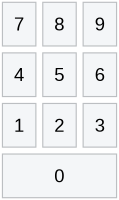
gap is one length or (column gap, row gap). In a cell, justify places a child horizontally and align
vertically (CSS justify-items and align-items); both default to "stretch", which sizes resizable
children to the cell. grid.span(child, columns=, rows=) lets a child cover several cells; children fill
the grid row by row, skipping cells already taken.
Changes re-lay the group out
Layout is lazy. Nothing is computed while you build or edit: a group arranges itself when it or one of its
children is measured (bounds(), place(...), align(...)) and before any output. Setting gap,
padding, width, align_items, justify_content, the columns, or changing a child (its text, its size,
a new child) all show on the next read.
import svgwriter as svg

label = svg.text("OK", font_size=14)
button = svg.HStack(label, padding=(6, 12), background="box")
print(button.bounds().width)
label.text_content = "Continue"
print(button.bounds().width)
Stacks nest freely: a grid in a card, a row of buttons in a panel. Arranging the outermost group arranges everything inside it, each group once.
Text sizes
Text is measured by its line box: the advance width of its characters, shaped like the renderer shapes
them, and the font’s ascent and descent. Labels of one font size have one height whatever their letters,
so a row of "7" and "-" keys lines up.
Units
Lengths are numbers of user units or lengths with units: "2mm", svg.mm(2), "0.5in". In a document
whose viewBox counts in a physical unit, as svg.Document(size="a4") does in millimetres, lengths with
units convert to that unit, so gap=svg.mm(2) is two millimetres on paper, as it is for attributes
and path tools.
import svgwriter as svg

doc = svg.Document(size="a6-landscape")
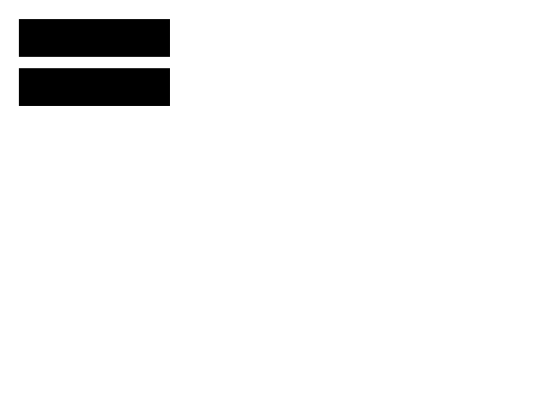
panel = doc.add(svg.VStack(doc.rect(0, 0, 40, 10), doc.rect(0, 0, 40, 10), gap=svg.mm(3), padding="5mm"))
print(panel.bounds())
Output and export
A layout writes <g transform="..."> groups and sized rects: no CSS layout and no foreignObject. Read
back with svg.parse or Document.open, the groups are plain groups. PDF, PowerPoint, PNG and every
other format draw the same positions as the SVG.
group.arrange() places the children at once, for code that reads a child’s matrix directly. A clone of a
layout is a live layout too: changing its gap re-lays out the copy only.