Layout
Stacks and grids that place their children by size; see the Layout guide.
svg.VStack, svg.HStack, svg.Grid and svg.Spacer are also available at the top level.
Layout groups: stacks and grids that place their children by size.
VStack, HStack and Grid are <g> elements that move their
children (and stretch rects, images and nested layouts) from their measured boxes, with gaps,
padding, alignment and an optional background. Changing a child, the gap or the size re-lays
the group out the next time it is measured or written. The output is plain groups with
transforms, so every exporter keeps the layout.
Examples
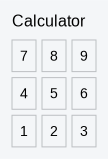
>>> import svgwriter as svg
>>> keys = [svg.VStack(svg.text(k, font_size=14), padding=8, align="center", background="box")
...         for k in "789456123"]
>>> card = svg.VStack(svg.text("Calculator", font_size=16), svg.Grid(*keys, columns=3, gap=6),
...                   gap=10, padding=12, background="surface")
>>> doc = svg.Document()
>>> doc += card
>>> card.bounds().width > 0
True
- class Frame(*children: Element | str, padding: float | str | Length | Sequence[float | str | Length] = 0, width: float | str | Length | None = None, height: float | str | Length | None = None, background: Element | str | None = None, **kwargs: Any)[source]
Bases:
GroupA
<g>that places its children itself; the base ofVStack,HStackandGrid.The frame’s box starts at its local origin and is sized by its content plus padding, unless width or height fix it. Children are moved with transforms (and stretched children resized), so the output is plain SVG. Arranging is lazy: it runs when the frame or a child is measured and before any output, and never on attribute writes.
- Parameters:
*children (Element) – The content, in order.
padding (length or sequence of lengths, optional) – Space inside the edges, like CSS: one length,
(vertical, horizontal)or(top, right, bottom, left). Defaults to 0.width (length, optional) – Fixed outer size; None sizes the frame to its content. Defaults to None.
height (length, optional) – Fixed outer size; None sizes the frame to its content. Defaults to None.
background (Element or str, optional) – A shape sized to the frame and drawn behind the children, or a theme role name for a plain rect in that role. Defaults to None.
**kwargs – Presentation, core and other
<g>attributes in Python spelling.
Notes
Lengths are numbers of user units, or lengths with units (
"2mm",svg.mm(2)). In a document whoseviewBoxcounts in a physical unit (Document(size="a4")), lengths with units convert to that unit, sogap=svg.mm(2)is 2 mm on paper.Examples
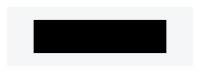
>>> import svgwriter as svg
>>> card = svg.VStack(svg.rect(0, 0, 40, 10), padding=(4, 8), background="surface")
>>> card.bounds()
BBox(x=0.0, y=0.0, width=56.0, height=18.0)
- arranges_children: ClassVar[bool] = True
True for layout groups, which place their children before any child is measured.
- property padding: float | str | Length | Sequence[float | str | Length]
one length,
(vertical, horizontal)or(top, right, bottom, left).Examples
>>> import svgwriter as svg
>>> box = svg.VStack(svg.rect(0, 0, 10, 10))
>>> box.padding = (2, 4)
>>> box.bounds().width
18.0

- Type:
Space inside the edges
- property width: float | str | Length | None
Fixed outer width, or None to fit the content.
Examples
>>> import svgwriter as svg
>>> row = svg.HStack(svg.rect(0, 0, 10, 10))
>>> row.width = 50
>>> row.bounds().width
50.0

- property height: float | str | Length | None
Fixed outer height, or None to fit the content.
Examples
>>> import svgwriter as svg
>>> column = svg.VStack(svg.rect(0, 0, 10, 10), height=40)
>>> column.bounds().height
40.0

- property background: Element | None
The shape behind the children, sized to the frame; assign a shape, a role name or None.
A rect or image takes the frame’s size; any other shape is scaled to fill it.
Examples
>>> import svgwriter as svg
>>> card = svg.VStack(svg.rect(0, 0, 30, 10), padding=5)
>>> card.background = svg.rect(0, 0, 1, 1, rx=4, fill="white")
>>> card.background.bounds()
BBox(x=0.0, y=0.0, width=40.0, height=20.0)

- arrange() Frame[source]
Place the children now (it also happens on its own before any measuring or output).
- Returns:
Frame – This frame.
Examples
>>> import svgwriter as svg
>>> a, b = svg.rect(0, 0, 10, 4), svg.rect(0, 0, 10, 4)
>>> _ = svg.HStack(a, b, gap=2).arrange()
>>> b.matrix.apply(0, 0)
Point(x=12.0, y=0.0)

- local_bbox() BBox[source]
The frame’s box: its local origin to its outer size.
- Returns:
BBox –
(0, 0, width, height)after arranging.
Examples
>>> import svgwriter as svg
>>> svg.HStack(svg.rect(0, 0, 10, 4), svg.rect(0, 0, 6, 8), padding=1).local_bbox()
BBox(x=0.0, y=0.0, width=18.0, height=10.0)
- local_outline() PathData[source]
Union of the arranged children’s outlines.
- Returns:
PathData – The combined outline.
Examples
>>> import svgwriter as svg
>>> svg.VStack(svg.rect(0, 0, 4, 4), svg.rect(0, 0, 4, 4), gap=2).local_outline().bbox
BBox(x=0.0, y=0.0, width=4.0, height=10.0)
- clone(linked: Literal[False] = False) Frame[source]
- clone(linked: Literal[True]) Use
A deep, detached copy that keeps the layout settings; see
Element.clone().- Parameters:
linked (bool, optional) – Return a
<use>of this frame instead. Defaults to False.- Returns:
Element – The copy, or a
<use>.
Examples
>>> import svgwriter as svg
>>> card = svg.VStack(svg.rect(0, 0, 10, 10), padding=2, background="surface")
>>> twin = card.clone()
>>> twin.background is twin.children[0], twin.bounds() == card.bounds()
(True, True)

- class Grid(*children: Element | str, columns: int | str | Sequence[float | str | Length], rows: int | str | Sequence[float | str | Length] | None = None, gap: float | str | Length | tuple[float | str | Length, float | str | Length] = 0, align: str = 'stretch', justify: str = 'stretch', **kwargs: Any)[source]
Bases:
FrameChildren in rows and columns, filled row by row.
See
Framefor padding, width, height and background.- Parameters:
*children (Element) – The content, placed left to right then top to bottom; a
Spacerleaves a cell empty.columns (int, str or sequence) – A number of equal
"1fr"columns, or one size per column:"auto"(fits its widest child), a length (fixed) or"Nfr"(a share of the free width), as a list or a space-separated string ("auto 1fr 1fr").rows (int, str or sequence, optional) – Row sizes, written like columns. Rows past these, or all rows when None, are
"1fr", so rows come out equal. Defaults to None.gap (length or (length, length), optional) – Space between cells: one length, or
(column gap, row gap). Defaults to 0.align ({"start", "center", "end", "stretch"}, optional) – Vertical placement in each cell, like CSS
align-items. Defaults to"stretch".justify ({"start", "center", "end", "stretch"}, optional) – Horizontal placement in each cell, like CSS
justify-items. Defaults to"stretch".**kwargs – padding, width, height, background and
<g>attributes.
Notes
"stretch"resizes rects, images and layout groups to their cell; other children stay at the cell’s start. Usespan()for children covering several cells.Examples
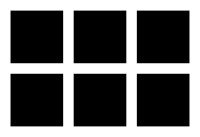
>>> import svgwriter as svg
>>> keys = [svg.rect(0, 0, 10, 10) for _ in range(6)]
>>> pad = svg.Grid(*keys, columns=3, gap=2)
>>> pad.bounds(), keys[4].bounds()
(BBox(x=0.0, y=0.0, width=34.0, height=22.0), BBox(x=12.0, y=12.0, width=10.0, height=10.0))
- property columns: int | str | Sequence[float | str | Length]
The column count or sizes.
Examples
>>> import svgwriter as svg
>>> grid = svg.Grid(*[svg.rect(0, 0, 10, 10) for _ in range(4)], columns=4)
>>> grid.columns = 2
>>> grid.bounds().height
20.0

- property rows: int | str | Sequence[float | str | Length] | None
The row sizes, or None for equal rows as needed.
Examples
>>> import svgwriter as svg
>>> grid = svg.Grid(svg.rect(0, 0, 10, 10), columns=1, rows=[30])
>>> grid.bounds().height
30.0
- property gap: float | str | Length | tuple[float | str | Length, float | str | Length]
one length or
(column gap, row gap).Examples
>>> import svgwriter as svg
>>> grid = svg.Grid(svg.rect(0, 0, 10, 10), svg.rect(0, 0, 10, 10), columns=2)
>>> grid.gap = (6, 0)
>>> grid.bounds().width
26.0

- Type:
Space between cells
- property align_items: str
Vertical placement in each cell (the align argument).
Examples
>>> import svgwriter as svg
>>> grid = svg.Grid(svg.rect(0, 0, 10, 4), columns=1, rows=[10])
>>> grid.align_items = "end"
>>> grid[0].bounds().y
6.0

- property justify_items: str
Horizontal placement in each cell (the justify argument).
Examples
>>> import svgwriter as svg
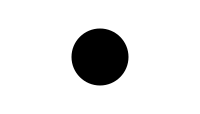
>>> grid = svg.Grid(svg.circle(0, 0, 2), columns=[10], justify="center")
>>> grid[0].bounds().x
3.0
- span(child: E, columns: int = 1, rows: int = 1) E[source]
Let child cover columns by rows cells.
- Parameters:
- Returns:
Element – child.
- Raises:
ValueError – If child is not in this grid or a span is below one.
Examples
>>> import svgwriter as svg
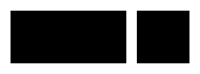
>>> zero, dot = svg.rect(0, 0, 10, 10), svg.rect(0, 0, 10, 10)
>>> grid = svg.Grid(zero, dot, columns=3, gap=2)
>>> grid.span(zero, columns=2).bounds().width, dot.bounds().x
(22.0, 24.0)
- class HStack(*children: Element | str, gap: float | str | Length = 0, align: str = 'start', justify: str = 'start', **kwargs: Any)[source]
Bases:
StackChildren left to right; see
Stackfor the arguments.Examples
>>> import svgwriter as svg
>>> row = svg.HStack(svg.rect(0, 0, 10, 10), svg.rect(0, 0, 10, 10), gap=4, padding=2)
>>> row.bounds(), row[1].bounds().x
(BBox(x=0.0, y=0.0, width=28.0, height=14.0), 16.0)

- class Spacer(grow: float = 1.0, **kwargs: Any)[source]
Bases:
GroupFlexible empty space in a stack: spacers share the free space along the main axis.
- Parameters:
grow (float, optional) – This spacer’s share relative to the other spacers. Defaults to 1.
Notes
A stack with spacers fills its fixed size, so its
justifyhas nothing left to distribute. In the output a spacer is an empty<g/>.Examples
>>> import svgwriter as svg
>>> a, b = svg.rect(0, 0, 10, 10), svg.rect(0, 0, 10, 10)
>>> _ = svg.HStack(a, svg.Spacer(), b, width=100)
>>> b.bounds().x
90.0

- class Stack(*children: Element | str, gap: float | str | Length = 0, align: str = 'start', justify: str = 'start', **kwargs: Any)[source]
Bases:
FrameChildren in a row or column, with a gap, alignment across and distribution along the axis.
Use
VStackorHStack; seeFramefor padding, width, height and background.- Parameters:
*children (Element) – The content, in order;
Spacerchildren take the free space.gap (length, optional) – Space between neighbours. Defaults to 0.
align ({"start", "center", "end", "stretch"}, optional) – Placement across the axis, like CSS
align-items."stretch"resizes rects, images and layout groups to the stack’s cross size; other children stay at the start. Defaults to"start".justify ({"start", "center", "end", "space_between", "space_around", "space_evenly"}, optional) – Distribution of free space along the axis when the stack is larger than its content, like CSS
justify-content. Defaults to"start".**kwargs – padding, width, height, background and
<g>attributes.
Examples
>>> import svgwriter as svg
>>> row = svg.HStack(svg.rect(0, 0, 10, 10), svg.rect(0, 0, 10, 4), gap=5, align="center")
>>> row[1].bounds()
BBox(x=15.0, y=3.0, width=10.0, height=4.0)

- property gap: float | str | Length
Space between neighbouring children.
Examples
>>> import svgwriter as svg
>>> column = svg.VStack(svg.rect(0, 0, 4, 4), svg.rect(0, 0, 4, 4))
>>> column.gap = 6
>>> column.bounds().height
14.0



- class VStack(*children: Element | str, gap: float | str | Length = 0, align: str = 'start', justify: str = 'start', **kwargs: Any)[source]
Bases:
StackChildren top to bottom; see
Stackfor the arguments.Examples
>>> import svgwriter as svg
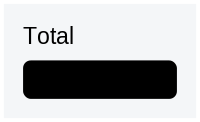
>>> card = svg.VStack(svg.text("Total", font_size=12), svg.rect(0, 0, 80, 20, rx=4),
...                   gap=6, padding=10, align="stretch", background="surface")
>>> card.bounds().width, card[2].bounds().width
(100.0, 80.0)
- settle(root: Element) None[source]
Arrange every layout group under root (included) now.
Output (strings, files, rendering and every exporter) calls this, and a group arranges itself whenever it or one of its children is measured, so calling it is only needed to read children’s transforms (
child.matrix) directly.- Parameters:
root (Element) – The tree to arrange.
Examples
>>> import svgwriter as svg
>>> a, b = svg.rect(0, 0, 10, 10), svg.rect(0, 0, 10, 10)
>>> stack = svg.VStack(a, b, gap=5)
>>> svg.layout.settle(stack)
>>> b.matrix.apply(0, 0)
Point(x=0.0, y=15.0)

- settled(root: Element) Generator[None, None, None][source]
Arrange every layout group under root and keep that arrangement for the block.
Measuring inside the block (output asks each group for its box while writing) reuses the arrangement instead of laying the tree out again, so the tree must not change inside it. Joins an enclosing block.
- Parameters:
root (Element) – The tree to arrange.
- Yields:
None
See also
settleArrange once, without holding the arrangement.
Examples
>>> import svgwriter as svg
>>> stack = svg.VStack(svg.rect(0, 0, 10, 10), svg.rect(0, 0, 10, 10), gap=5)
>>> with svg.layout.settled(stack):
...     stack.bounds().height
25.0