Text
Text, runs and styles
import svgwriter as svg

doc = svg.Document(300, 80)
title = doc.text("Hello ", x=10, y=50, font_size=32, font_family="Georgia, serif")
title.span("world", fill="crimson", font_weight="bold")
print(title.characters)          # 'Hello world'
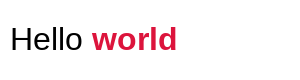
Fonts come from the computed style: attributes on the text and its tspans, inherited values from
ancestors, and CSS from <style> elements all apply, as in a browser. Whitespace follows SVG’s
xml:space rules.
Characters as handles
text[i] is a live Character and text[a:b] a CharacterRange. Moving and
rotating them edits SVG’s per-character dx/dy/rotate lists, so the result is still real,
selectable text: Indexes count user-perceived characters (grapheme clusters): "é" written as e plus a combining
accent, a ZWJ emoji family, a flag or a keycap is one character. Runs in complex scripts (Arabic joining, Hebrew,
Indic conjuncts, Thai, …) are shaped; Latin text keeps glyph-by-glyph layout. In a shaped run the first
character of each cluster carries its glyphs.
wavy = svg.Document(300, 60)
t = wavy.text("wavy text", x=10, y=40, font_size=36)
for i, glyph in enumerate(t):
    glyph.translate(0, (-1) ** i * 3)
t[5:].rotate(-10)
print(len(t), t[0].char, t[0].position)
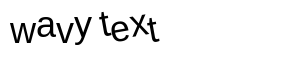
Setting a presentation attribute on a range wraps it in a <tspan>:
note = svg.text("Status: OK", x=0, y=20)
note[8:].fill = "green"
note[0:6].wrap(font_weight="bold")
print(note)

A list of positions, a mask with one bool per character, or a stepped slice picks several runs at
once as a CharacterSelection; setting an attribute styles every run:
word = svg.text("Mississippi", x=0, y=20)
word[[c == "s" for c in word.characters]].fill = "crimson"   # every s
word[[0, -1]].font_weight = "bold"                           # first and last letters
print(word[::2].chars)
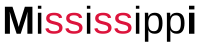
Scaling or skewing one character has no SVG text form; those calls raise and point to
text.glyphs(), which returns one outline <path> per character, styled like its run:
outlines = svg.text("BIG", x=0, y=40, font_size=40).glyphs()
outlines[1].scale(1.5)
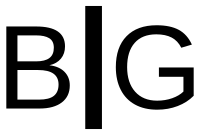
Outlines and measurement
word = svg.text("Outline", x=0, y=40, font_size=36)
path = word.to_path()                       # glyph outlines as a <path>
path.update(fill="none", stroke="crimson", stroke_width=1.5)      # drawn as outlines only
print(word.exact_bbox())
print(svg.ops.text_width("Outline", "sans-serif", 36))

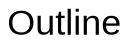
Text takes part in boolean operations (rect - text) and clipping (art.clip(text)) through its
outlines.
Fonts and scripts
font_family names are looked up among the installed system fonts. When the chosen font has no glyph
for a character, layout falls back per character to a system font that has one, as browsers do, so
Hindi, Bengali, Urdu, Chinese, Japanese and other scripts render with any family; xml:lang (for
example "zh" or "ja") steers that choice for shared CJK characters.
Emoji
Emoji come from the system’s colour emoji font (Segoe UI Emoji on Windows, Apple Color Emoji on macOS, Noto Color Emoji on Linux). Sequences such as skin tones (👍🏽), families joined with ZWJ (👨👩👧), keycaps (1️⃣) and flags (🇯🇵) are shaped as one user-perceived character, drawn as the single glyph the font provides. Colour glyphs have no outlines, so each format shows them as well as it can:
Format |
Emoji |
|---|---|
SVG, SVGZ, HTML |
Kept as text; the viewer’s emoji font draws them. |
PNG, JPEG, WebP, GIF, ICO, video and other rasters |
Drawn in colour from the emoji font. |
Drawn in colour as one glyph each; copy and search give the emoji’s characters. |
|
EPS |
Embedded as masked images (PostScript level 3). |
TikZ |
Drawn as small filled pixel cells, since LaTeX cannot typeset colour emoji. |
PowerPoint |
Kept as text in the text boxes; PowerPoint draws them. |
DXF, HPGL, G-code, Excalidraw |
Skipped with a warning: these formats hold only outlines. |
to_path(), text_outline() and boolean operations use outlines, so emoji are left out of them. With
no colour emoji font installed, emoji fall back to whatever font has the characters.
Typography
font_family takes names of installed fonts. For a family you ship with the drawing, or to measure and
embed one, make an svg.Typeface: a font family made of faces (regular, bold, italic, condensed, or one
variable font covering a whole range). It works like a CSS @font-face family.
import svgwriter as svg

sans = svg.Typeface("sans-serif")      # an installed family; generic names pick an installed one
# inter = svg.Typeface.from_files("Inter-Regular.ttf", "Inter-Bold.ttf", "Inter-Italic.ttf")
# brand = svg.Typeface.from_folder("assets/fonts", "Inter")
# custom = svg.Typeface("Brand", {(400, "normal"): "brand.ttf", (700, "italic"): "brand-heavy.ttf"})

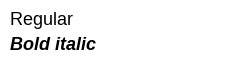
doc = svg.Document(240, 60)
doc.text("Regular", x=10, y=25, font_family=sans, font_size=18)
doc.text("Bold italic", x=10, y=50, font=sans, font_size=18, font_weight="bold", font_style="italic")
from_files reads each face’s family, weight (OS/2 weight class), style and width from inside the
file, never from its name: the typographic family comes first, so “Inter SemiBold” files join “Inter”,
and face.subfamily keeps the style name (“SemiBold Italic”). Sources may be paths, bytes, binary
streams or data: URIs; collections (.ttc) add every face. A mapping of (weight, style) to files
states the descriptors instead. A variable font covers its wght, wdth
and slnt ranges, listed in face.axes. Faces loaded from files are registered at once, so layout,
measurement, outlines and rendering use them without installing anything.
Text picks a face with the CSS font matching rules: the style first (italic, then oblique, then upright), then the nearest weight, looking heavier for weights above 500, lighter below 400, and up to 500 first in between. A variable face is set to the exact weight asked for.
bold = sans.face(weight=700)
metrics = bold.metrics.at(18)           # ascent, descent, x_height, cap_height at size 18
width = bold.measure("Total", 18)       # shaped advance width
sans.measure("Total", 18, weight=700) == width
Measure with the face, then draw with the family: measure uses the same shaping and fallback as layout.
Embedding fonts
An SVG file names its fonts; viewers without them substitute others. doc.embed_fonts() adds a
<style> with an @font-face rule per face the text actually uses, the font file inside as a data URI,
so browsers draw the file with its own fonts. doc.used_faces() lists those faces and
typeface.css() gives the rules of a whole family; typeface.css(embed=False) refers to the fonts
instead (local(...) for installed faces, the file path for file faces), for SVG kept next to its fonts.
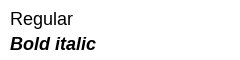
doc.embed_fonts(sans)
Embed only fonts whose licence allows it. For output that needs no fonts at all, convert text to
outlines with text.to_path().
Themes and projects
A theme’s fonts.family and fonts.monospace take a Typeface, and in a theme file a family name or
a list of font files relative to the file:
[fonts]
family = ["fonts/Inter-Regular.ttf", "fonts/Inter-Bold.ttf"]
Projects register every file in assets/fonts when they build, so those families are usable by name.
Registering single files
svg.register_font(path) is the low-level call under Typeface: it registers one file under its
family name (or family=), with optional weight= and style= descriptors, and returns the name.
# family = svg.register_font("Inter-Regular.ttf")   # returns the family name stored in the file
# svg.text("Hello", x=0, y=40, font_family=family, font_size=32).to_path()
svg.Typeface is not svg.Font. svg.Font is the SVG 1.1 <font> element, which defines glyphs as
paths inside the document; browsers no longer draw SVG fonts, so svgwriter keeps the element for reading
and writing such files. A Typeface is a real font family (TrueType or OpenType files) that text is set in.