Geometry and transforms
Local geometry, one transform
An element’s SVG coordinates (cx, x, width, d, points) are its local geometry and are written
exactly as given. Everything that places the element afterwards edits its transform, el.matrix, an immutable
affine Matrix.
import svgwriter as svg

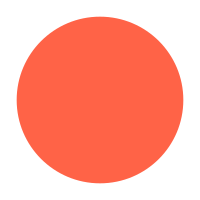
c = svg.circle(50, 50, 10, fill="tomato")
c.translate(20, 0).rotate(90)
print(c.cx)          # 50.0: the local geometry never changes
print(c.position)    # Point(x=70.0, y=50.0): where the anchor (centre) is now
print(c.matrix)      # the transform as one matrix
print(c)             # <circle cx="50" cy="50" r="10" transform="..."/>
The anchor
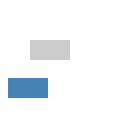
Rotation, scaling, skewing and flipping pivot on the anchor, given in local coordinates. By default it is the centre of the element’s bounding box and follows geometry edits; set it to pin it.
doc = svg.Document(140, 140)
doc.rect(30, 40, 40, 20, fill="#ccc")        # the original, for comparison
r = doc.rect(30, 40, 40, 20, fill="steelblue")
print(r.anchor)              # Point(x=20.0, y=10.0)
r.anchor = (0, 0)            # pivot on the top-left corner from now on
r.rotate(30)
r.anchor = None              # back to the centre
r.rotate(-30, about=(60, 60))     # or pass a pivot for one call
doc
Parent frame or local frame
Each method composes in the parent frame by default: translate(10, 0) moves ten units right on
screen whatever the current rotation. local=True uses the element’s own (rotated, scaled) axes.
doc = svg.Document(80, 80)
doc.rect(20, 20, 20, 20, fill="#ccc")                                       # where both start
a = doc.rect(20, 20, 20, 20, fill="tomato").rotate(90).translate(20, 0)            # right on screen
b = doc.rect(20, 20, 20, 20, fill="royalblue").rotate(90).translate(20, 0, local=True)   # its own x axis: down
print(a.position, b.position)

method |
effect |
|---|---|
|
move |
|
rotate, positive turns from +x towards +y |
|
scale; negative factors mirror |
|
shear |
|
mirror about the anchor |
|
compose any matrix |
|
move the anchor to a point |
|
drop the transform |
All return the element, so they chain. Gradients and patterns have the same methods; they edit
gradientTransform and patternTransform.
Operators
Numbers and pairs transform a copy; element operands keep their structural meaning.
dot = svg.circle(0, 0, 8, fill="steelblue")
results = [
    dot,                                                # the original
    dot + (10, 20),                                     # translated copy
    dot * 2,                                            # scaled copy about the anchor
    svg.rect(0, 0, 24, 6, fill="tomato") @ 45,          # rotated copy ("at 45 degrees")
    svg.Matrix.translate(5, 0) @ dot,                   # matrix in the parent frame
    dot + svg.circle(20, 0, 8, fill="gold"),            # a <g> holding both
]
row = svg.Document(340, 60)                             # the results side by side
for n, el in enumerate(results):
    row.add(el.place(30 + 55 * n, 30))
dot += (1, 1)                   # in place

* and @ never bake coordinates. To fold the transform into the geometry, convert:
el.to_path() returns a <path> whose d already includes the transform.
Things to keep in mind:
A bare number broadcasts like numpy:
el + 5moves by(5, 5), while the methodel.translate(5)follows SVG’stranslate(5)and moves by(5, 0).Operators never take elements out of a document:
a + bcopies operands that already have a parent. The in-place forms work in place:a -= bputs the resulting<path>whereawas, keeping its id.+groups and-cuts, soa + b - bis nota: the group is cut byb’s outline.Images composite through their pixels:
img.pixels | other.pixels(see Compositing images); on the element, numbers and offsets transform, soimg * 2scales.
Bounds
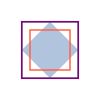
doc = svg.Document(100, 100)
box = doc.rect(30, 30, 40, 40, fill="lightsteelblue").rotate(45)
print(box.local_bbox())     # before the transform
print(box.bounds())         # after it, in parent coordinates
print(box.exact_bbox())     # tight box of the transformed outline
for found, color in ((box.local_bbox(), "tomato"), (box.bounds(), "seagreen"), (box.exact_bbox(), "purple")):
    doc.rect(*found, fill="none", stroke=color, stroke_width=1.5)      # the three boxes drawn on the shape
Placing and aligning
Boxes have edges (left, right, top, bottom) and named points (center, top_left,
top_center, bottom_right, …; box.point("top") is the middle of the top edge). Elements use the
same names to move by their bounds:
title = svg.rect(0, 0, 80, 20, fill="steelblue")
badge = svg.circle(0, 0, 6, fill="tomato").align(title, "center_left", to="center_right", offset=(4, 0))
note = svg.rect(0, 0, 30, 8, fill="gold").align(title, "top_left", to="bottom_left", offset=(0, 2))
logo = svg.Polygon.regular(0, 0, 10, 5, fill="seagreen").place(100, 100, at="bottom_right")
print(note.bounds().top, badge.bounds().left)
placed = svg.Document(110, 110, view_box=(-5, -5, 110, 110))
placed += [title, badge, note, logo]
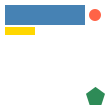
place(x, y, at=...) moves a named point onto a coordinate; align(target, at, to=...) moves it onto a
point of another element, box or (x, y), so a.align(b, "top", to="bottom") stacks a under b.
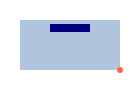
Elements also have the box’s edges and points as attributes. Reading one gives the edge (a number) or point of the element’s bounds; assigning one moves the element so that edge or point lands there:
card = svg.rect(20, 20, 100, 50, fill="lightsteelblue")
heading = svg.rect(0, 0, 40, 8, fill="navy")
heading.center = card.center              # centred on the card
heading.top = card.top + 4                # then 4 units below the card's top edge
pin = svg.circle(0, 0, 3, fill="tomato")
pin.center = card.bottom_right            # on the card's corner
print(heading.top_left, pin.center)
sheet = svg.Document(140, 90)
sheet += [card, heading, pin]
Units and angles
Plain numbers are user units (CSS pixels, 96 per inch). Lengths such as svg.mm(5) or 2 * svg.inch and
angles such as svg.deg(30) carry their unit and combine across units; see the Units guide.
Many elements from arrays
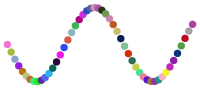
Class.many(**columns) builds many elements in one call; scalars apply to all and arrays give one
value each, like numpy broadcasting. Colors can be names, one color, or an (n, 3|4) array:
import numpy as np

xs = np.linspace(0, 100, 50)
dots = svg.Circle.many(cx=xs, cy=50 + 20 * np.sin(xs / 10), r=2, fill=np.random.rand(50, 3))
cloud = svg.group(*dots)
Matrices and numpy
import numpy as np

m = svg.Matrix.rotate(90) @ svg.Matrix.scale(2)
points = np.array([[1.0, 0.0], [0.0, 1.0]])
print(m @ points)                    # maps (..., 2) arrays in one step
print(np.asarray(m).shape)           # (3, 3) homogeneous matrix