Working with Inkscape files
Drawings saved by Inkscape open as ordinary documents and save back with everything Inkscape stores
alongside the SVG: layers, object names, editable stars and arcs, connectors, guides, path effects and
export settings. Layers also work in plain documents; see Layers. Their inkscape: and sodipodi: attributes keep their prefixes, declared once on the
root, so the file reads the same in Inkscape after svgwriter has edited it.
import svgwriter as svg

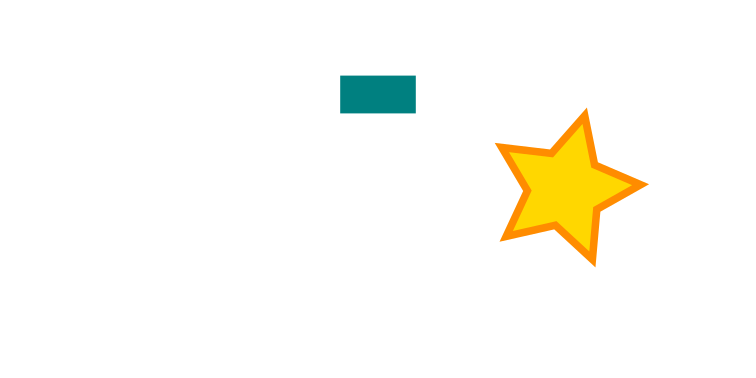
INKSCAPE_FILE = """<svg xmlns="http://www.w3.org/2000/svg" width="200mm" height="100mm" viewBox="0 0 200 100"
     xmlns:inkscape="http://www.inkscape.org/namespaces/inkscape"
     xmlns:sodipodi="http://sodipodi.sourceforge.net/DTD/sodipodi-0.dtd">
  <sodipodi:namedview inkscape:document-units="mm">
    <sodipodi:guide position="20,100" orientation="1,0" inkscape:label="margin"/>
  </sodipodi:namedview>
  <g inkscape:groupmode="layer" inkscape:label="Shapes">
    <path id="star" inkscape:label="Logo" sodipodi:type="star" sodipodi:sides="5" sodipodi:cx="150"
          sodipodi:cy="50" sodipodi:r1="20" sodipodi:r2="10" sodipodi:arg1="-1.5707963"
          sodipodi:arg2="-0.9424778" inkscape:flatsided="false" inkscape:rounded="0" fill="gold" stroke="darkorange" stroke-width="2"
          d="M150 30 L155.9 41.9 L169 43.8 L159.5 53.1 L161.8 66.2 L150 60 L138.2 66.2 L140.5 53.1 L131 43.8 L144.1 41.9 Z"/>
    <rect id="box" x="90" y="20" width="20" height="10" fill="teal"/>
  </g>
</svg>"""
with open("drawing.svg", "w", encoding="utf-8") as handle:
    handle.write(INKSCAPE_FILE)

doc = svg.Document.open("drawing.svg")
doc["Logo"].rotate(15)                 # found by its Inkscape label
print(list(doc.layers), doc.guides[0])
doc.save("drawing.svg")                # still an Inkscape drawing
Labels as names
Inkscape names objects with inkscape:label (the name in its Objects panel). element.label reads and
sets it, and doc["name"] looks for an id first and then for a label, so names chosen in Inkscape work
in code. A label shared by several elements raises KeyError; give those elements ids instead.
import svgwriter as svg

doc = svg.Document(100, 100)
sun = doc.circle(50, 50, 20, fill="gold")
sun.label = "Sun"
print(doc["Sun"] is sun, "Sun" in doc)

Rotation centres
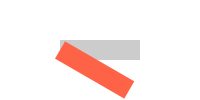
When an object’s rotation centre was moved in Inkscape (inkscape:transform-center-x and -y), it
becomes the element’s anchor, so rotate, scale and
animations turn around the same point. Writing an Inkscape document stores the anchor back for Inkscape.
Inkscape keeps the centre as an offset from the middle of the bounding box, in user units with y pointing
up; svgwriter converts both ways.
import svgwriter as svg

doc = svg.Document(200, 100)
with doc.layer("Parts"):
    doc.rect(60, 40, 80, 20, fill="#ccc")                # the arm before it turns, as a ghost
    arm = doc.rect(60, 40, 80, 20, fill="tomato", anchor=(60, 50))     # pivot on the left edge
print('inkscape:transform-center-x="-40"' in doc.to_string())   # True
arm.rotate(30)                                          # turns around the same point
Stars, polygons and arcs
Inkscape draws stars, polygons, ellipses and pie slices as paths with their parameters alongside.
svg.inkscape.Star and svg.inkscape.Arc are live views on those parameters: assigning one redraws the
path the way Inkscape does, and the parameters stay editable with Inkscape’s tools.
svg.inkscape.shape(element) returns the right view, or None for any other element. Angles are in
degrees.
import svgwriter as svg

doc = svg.Document(200, 100)
logo = doc.add(svg.paths.star(50, 50, 30, 12, 5, inkscape=True, fill="gold"))
hexagon = doc.add(svg.paths.regular_polygon(150, 50, 25, 6, inkscape=True, fill="teal"))

star = svg.inkscape.shape(logo)
star.sides = 7                          # 7 tips, redrawn
star.rounded = 0.2                      # Inkscape's rounding
pie = doc.add(svg.inkscape.Arc.create(100, 80, 15, 15, start=0, end=270, fill="tomato"))
svg.inkscape.Arc(pie).kind = "chord"
print(star.sides, round(star.angle), svg.inkscape.shape(hexagon).flatsided)

svg.paths.star(..., inkscape=True) and svg.paths.regular_polygon(..., inkscape=True) build these
paths; corner_radius does not combine with them (use rounded instead).
Connectors
A connector is a path attached to two objects (inkscape:connection-start and -end); Inkscape reroutes
it when either object moves. path.connects gives the two elements, and assigning a pair attaches a path
(it is drawn as a straight line between their centres until Inkscape reroutes it).
import svgwriter as svg

doc = svg.Document(200, 60)
a, b = doc.circle(30, 30, 15, fill="gold"), doc.circle(170, 30, 15, fill="teal")
wire = doc.path(stroke="crimson", stroke_width=3, fill="none")
wire.connects = (a, b)
print(wire.connects.start is a, wire.d)
wire.connects = None                     # a plain path again

Guides
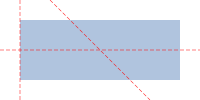
doc.guides lists Inkscape’s guide lines as Guide values in the drawing’s
own coordinates (y down), and assigning a list replaces them. doc.guide(x=...) adds a vertical guide,
doc.guide(y=...) a horizontal one, and doc.guide(x, y, angle=...) a slanted one.
import svgwriter as svg

doc = svg.Document(200, 100)
doc.rect(20, 20, 160, 60, fill="lightsteelblue")
doc.guide(x=20, label="margin")
doc.guide(y=50)
doc.guide(100, 50, angle=45, color="#ff0000")
print([(g.x, g.y, g.angle) for g in doc.guides])
for x1, y1, x2, y2 in [(20, 0, 20, 100), (0, 50, 200, 50), (50, 0, 150, 100)]:     # guides are for the editor:
    doc.line(x1, y1, x2, y2, stroke="red", stroke_width=0.5, stroke_dasharray="4 2")   # sketched here as dashed lines
Export hints
doc.export_hints holds what Inkscape remembers about exporting: the bitmap resolution
(inkscape:export-xdpi), the last export file name and the document units. Raster exports
(doc.save("a.png"), JPEG, WebP, BMP) use the stored resolution when no scale, dpi or size is
given.
import svgwriter as svg

doc = svg.Document(100, 50)
doc.rect(5, 5, 90, 40, rx=6, fill="seagreen")
doc.text("200 x 100 px", x=50, y=30, font_size=10, text_anchor="middle", fill="white")
doc.export_hints = svg.inkscape.ExportHints(dpi=192, units="mm")
doc.save("preview.png")                  # 200 x 100 pixels
print(doc.export_hints)
Kept as they are
Path effects (inkscape:path-effect, inkscape:original-d and the <inkscape:path-effect> definitions),
sodipodi:namedview settings, metadata (rdf:, cc:, dc:) and attributes of any other namespace are
kept untouched, with the prefixes the file declared. svgwriter draws a path effect’s result (d), which is
what Inkscape saved.
The Inkscape extension
The plugins/inkscape folder of the repository (also attached to each release as
svgwriter-inkscape.zip) adds three effects under Extensions > svgwriter:
Run svgwriter Code runs Python on the open drawing:
docis the drawing as aDocument,svgthe module,selectionthe selected objects. Write ordinary svgwriter code, such asdoc["title"].animate.typewriter(dur=2), loops and functions; the result appears on the canvas, and Live preview shows it before you apply it. Errors appear with the failing line. The box runs Python with your permissions, so run only code you trust.Save with svgwriter saves the drawing to PowerPoint (with animations), Word, PDF, TikZ, EPS, G-code, HPGL, DXF, HTML, PNG, GIF, WebP or Excalidraw.
Apply svgwriter Theme styles objects that carry svgwriter roles with a built-in theme or a
theme.toml, and can give the selection a role first.
Animations added from the code box are stored as SMIL in the drawing: Inkscape shows the first frame,
keeps them when it saves, and the exporters play them (PowerPoint, GIF, HTML, APNG). Text is measured with
svgwriter’s font fallback, so generic families (sans-serif, serif, monospace) resolve to fonts
installed on Windows, macOS or Linux, and a missing family falls back with a warning rather than an error.
To install, copy the folder’s .inx and .py files into a folder inside Inkscape’s user extensions
folder (shown under Edit > Preferences > System) and restart Inkscape. The extensions need a Python
with svgwriter: either set Inkscape’s python-interpreter preference to one, or set the
SVGWRITER_PYTHON environment variable so only the svgwriter extensions use it. The folder’s
README.md has the details for each system.